Add AI to the apps and workflows you already have.
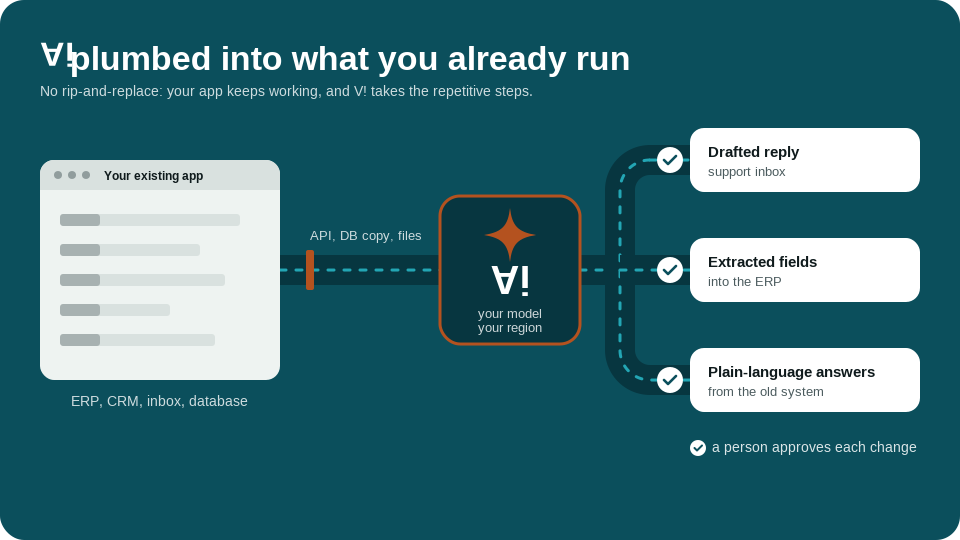
No rip-and-replace. Your systems keep working, and AI takes the repetitive steps.
Paperless from day one
Digital intake forms, e-signatures, and OCR of your existing paper archives into searchable storage in your business region, with retention rules.
Workflows that evolve
AI watches patterns in customer behavior (what they ask, buy, abandon and when they contact) and in workflow bottlenecks.
It proposes changes
Such as new routing rules, FAQ answers, follow-up timing or form fields.
A person approves each change
Results are compared before and after.
Dynamic, fluid workflows
Think of the plumbing. Your systems are the pipes and stay where they are. The rules you agree are the valves. Each request is what flows through, and it takes the right pipe in the moment instead of one fixed route.
Requests are routed by intent and urgency rather than a phone menu.
Forms ask only the questions this customer needs.
Priorities shift with volume and time of day.
Steps scale up or down with demand.
The valves are set up front, anything that doesn't fit a pipe is sent to a person, and every turn is logged, so nothing leaks.
This is different from workflows that evolve: evolving is re-plumbing the system over weeks through approved changes, while fluid is how each case moves through today's pipes.
Before and after examples
Support
Triage, drafted replies and call summaries.
Finance and operations
Invoice and form extraction, and order entry.
Knowledge
Plain-language answers from old systems and shared drives, with sources.
Reporting
Summaries sent on a schedule.
- Paperless from day oneforms, signatures and files go digital and searchable
- Read, tagged and routedwith a drafted reply
- Fields extracted and checkedstaff approve before posting
- Ask in plain languageanswers cite the record
- Summarized and sentfigures pulled from the source
- Call summary on screenwith the suggested next step
- Fluid workflowseach case flows down the right pipe, through valves you set
- Workflows that evolveV! spots customer patterns and suggests re-plumbing you approve
Examples are written ahead and refreshed weekly. In the free assessment we pick the one or two steps where V! saves the most time, and start there.
How we connect to legacy systems
APIs first, then read-only database replicas, file drops and email, with screen automation only when nothing else exists. The old app isn't modified.
Models and privacy
Open-source models in your own account, or private endpoints (Amazon Bedrock, Azure OpenAI, Google Vertex AI) in your business region.
Your data isn't used for training.
Prompts and outputs are logged for audit.
Control and cost
Human approval for actions.
Confidence thresholds that send unsure cases to a person.
Usage-based model costs with monthly caps, shown on the itemized bill.
Start small
The assessment picks one or two workflows. We pilot on real data, measure time saved, then expand.
FAQ
Do we need to replace our system?
No. Your legacy apps, databases, inboxes and spreadsheets keep working as they do. We connect through what your system already has: its API, a read-only database copy, file exports or, as a last resort, the screens your staff use.
Who owns the AI workflows and code we build?
You do, in your repository. Take it in-house, hand it to another team, or keep us on to run it. It's your choice, at any time.
Will AI make changes on its own?
Only where you allow it. AI drafts and suggests. Anything that changes a record or reaches a customer can need a person's approval, and every action is logged.
What if the model is wrong?
A person reviews it, and unsure cases are flagged.
Tell us what's not working.
One short call, no charge. You'll get a plain-language plan and a monthly cost estimate, whether or not you hire us.
hello@cloudplumb.dev